AWS Step-by-Step
What Happens When You Can't Explain Unexpected AWS Charges?
Over the years, I have written a few different blog posts related to tracking down and eliminating the source of unexpected AWS charges. While these articles each differed in scope, they all had one thing in common. They were based on the assumption that the charges were legitimate and that there was some forgotten resource that had been created in the AWS cloud and that was still incurring costs.
Although I try to keep a very close eye on my AWS spending and immediately delete any resources that I no longer need, I have occasionally been subject to unexpected charges. In each of those cases, however, a bit of investigation made the source of those charges readily apparent.
Today I discovered that sometimes there is no easy answer as to where unexpected charges come from. Fortunately, there are some ways to get help.
The problems began when I logged in this morning in preparation for writing my monthly AWS columns. As I'm sure you know, the Console Home displays cost and usage information for the last few months. As you can see in Figure 1, my costs are usually near zero since the only resources that I create are those used in writing blog posts. Those resources are usually deleted within hours. This time, however, there were some unexpected costs listed.
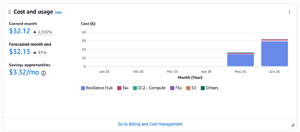 [Click on image for larger view.] Figure 1: The Console Home Lists Cost and Usage Information. (source: AWS).
A quick glance at the figure above reveals that these costs stem from the Resiliency Hub. In a way, that makes perfect sense, because I wrote about the Resiliency Hub last month. Even so, I was careful to delete any resources that I had created, and browsing the Resiliency Hub did not reveal any remaining resources. The Resource Explorer did not reveal any related resources either.
At this point, I decided to see if AI could help. I launched a new service (which is still in preview) called the FinOps Agent. This agent is designed to help you to optimize costs and to analyze billing anomalies.
Although there is a bit of setup that has to be done in order to use the FinOps Agent, the setup process is super simple. Just go to the AWS FinOps Agent screen and click the Create Agent button. From there, give your agent a name and then keep clicking Next to accept the defaults. When you are done, you will be taken to a web interface where you can ask questions related to your AWS billing.
As you can see in Figure 2, the AWS FinOps Agent explained that the charges likely stemmed from applications or services linked to the Resiliency Hub or the Next-Gen Resiliency Hub. According to the text, it's necessary to delete any lingering applications or services in order to avoid future billing.
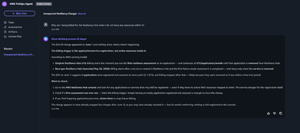 [Click on image for larger view.] Figure 2: The AWS FinOps Agent Provided Information on the Resiliency Hub Billing Policy and Gave Advice on How to Avoid Future Charges. (source: AWS).
Unfortunately, using the AWS FinOps Agent proved to be a dead end. Although the agent did provide me with good information, it failed to explain why I was being charged for resources that do not exist. That being the case, I turned my attention to Amazon Q.
I asked Amazon Q why I was being charged for using the Resiliency Hub even though the hub appears empty. Amazon Q went to work ingesting various data sources in an effort to resolve the issue. After a few minutes, Amazon Q came back with a summary of its findings, which you can see in Figure 3. The summary basically indicated that there may have been a billing error or that I might still be charged for deleted resources.
More importantly, Amazon Q gave me three immediate action steps, including reviewing the Cost Explorer, checking CloudTrail logs, and contacting AWS Support. Amazon Q even offered to create a support case for me.
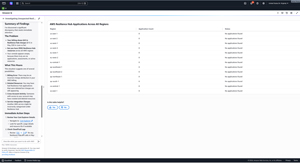 [Click on image for larger view.] Figure 3: Amazon Q Provided a Summary of Findings and Some Immediate Action Steps. (source: AWS).
After checking my CloudTrail logs and revisiting the Resiliency Hub one more time, I told Amazon Q to go ahead and create a support case. Interestingly, Q completely populated the support form on my behalf. All I had to do was to click Submit.
About the Author
Brien Posey is a 22-time Microsoft MVP with decades of IT experience. As a freelance writer, Posey has written thousands of articles and contributed to several dozen books on a wide variety of IT topics. Prior to going freelance, Posey was a CIO for a national chain of hospitals and health care facilities. He has also served as a network administrator for some of the country's largest insurance companies and for the Department of Defense at Fort Knox. In addition to his continued work in IT, Posey has spent the last several years actively training as a commercial scientist-astronaut candidate in preparation to fly on a mission to study polar mesospheric clouds from space. You can follow his spaceflight training on his Web site.