AWS Step-by-Step
Using EC2 Image Builder to Simplify the Gold AMI Creation Process, Part 1
One of the key steps in creating any virtual machine (VM) is that of deploying an operating system. Installing an operating system to an on premises VM running on a hypervisor such as VMware ESXi or Microsoft's Hyper-V usually involves using an ISO file. However, When you create a VM instance in the Amazon cloud however, the operating system installation process is enabled through an Amazon Machine Image, or AMI as it is often called. If you look at Figure 1 for example, you can see that Amazon provides several different operating systems for you to choose from. You need only to select the AMI that you want to deploy.
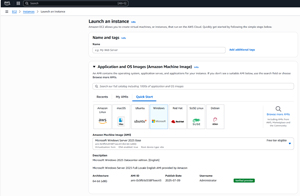 [Click on image for larger view.] Figure 1: Amazon provides a number of AMIs for you to choose from.
This of course, raises the question of why Amazon uses AMIs rather than using ISO files. One of the main reasons is that the AMIs that are provided by Amazon include drivers and components that are needed in order for the operating system to function in the Amazon cloud. As an example, most of the AMIs that Amazon provides include a System Manager (SSM) agent.
Even though the AMIs that Amazon provides include everything that you need in order to make an operating system work in the Amazon cloud, the AMIs are general purpose in nature. In other words, the AMIs are sufficient for getting the operating system up and running, but there will typically be organization specific customizations that need to take place once an instance has been created. This might involve fine tuning some security settings, deploying antimalware software or perhaps installing a backup agent.
Interestingly, Amazon makes it possible to build your own golden AMIs containing all of your various customizations. That way, when you deploy a VM instance, you don't have to worry about configuring the instance after the fact. The new instance will already include all of your various customizations. Better still, you aren't limited to building just one golden AMI. You can create an AMI for each role that your instances will serve. You could for example, build one AMI for SQL servers and another AMI for Web front end servers. Some organizations also choose to rebuild their golden AMIs monthly, as a way of reducing their patch management burden. Whatever the AMI strategy however, it is worth noting that there is a cost associated with each AMI that you create.
At one time, building an AMI involved creating a VM instance, customizing the instance based on your needs, and then generating an AMI from that instance. The new process, which is based on a tool called the EC2 Image Builder, still generates a VM instance, but this process happens behind the scenes. In fact, what you will spend most of your time building is not the AMI, but rather the image pipeline.
The image pipeline might best be thought of as a workflow. It combines a base image with various components and customizations. When executed, the pipeline generates an AMI.
Of course the big question is why is it so much better to use the pipeline to build the AMI rather than you manually creating the AMI yourself? The reason why the image pipeline will usually be the preferred option has to do with the way that custom AMIs are usually used. If an organization takes the time to build a custom AMI rather than using one of the built-in AMIs supplied by Amazon, it's usually going to be because the organization wants to create a gold image that it can use for creating VM instances that are based on the organization's own requirements.
The thing to keep in mind is that nobody creates a gold image and then uses that same image forever. Typically, organizations refresh their gold images on a somewhat frequent basis so as to make sure that all of the latest patches are included in the image. This is why it is so advantageous to create AMIs through an image pipeline. You can run the pipeline any time that you want as a way of producing an updated AMI without any significant manual effort. Better still, you can link the image pipeline to a schedule so that new AMIs are produced on a scheduled basis, thereby freeing you from the task of having to remember to create new AMIs each month (or however often you create them).
So now that I have talked about what the EC2 Image Builder is and what it does, I want to walk you through the process of using it in Part 2 of this series.
About the Author
Brien Posey is a 22-time Microsoft MVP with decades of IT experience. As a freelance writer, Posey has written thousands of articles and contributed to several dozen books on a wide variety of IT topics. Prior to going freelance, Posey was a CIO for a national chain of hospitals and health care facilities. He has also served as a network administrator for some of the country's largest insurance companies and for the Department of Defense at Fort Knox. In addition to his continued work in IT, Posey has spent the last several years actively training as a commercial scientist-astronaut candidate in preparation to fly on a mission to study polar mesospheric clouds from space. You can follow his spaceflight training on his Web site.