AWS Step-by-Step
Protecting Auto Scaling Groups Against Accidental Deletion
Amazon has recently introduced Deletion Protection Policies, which can protect auto scaling groups against accidental deletion. Better still, these policies can be combined with IAM roles, thereby allowing for multi-layered protection. For the purposes of this article, I want to take a look at what Deletion Protection Policies are and how to use them.
Deletion Protection Policies
Deletion Protection Policies are policies that are set at the auto scaling group level. This can be done at the time when the auto scaling group is first created, or you can go back and add protection later on. There are three levels of protection available.
The default deletion protection level is simply called None. As its name implies, the None setting offers no protection whatsoever, meaning that the autoscaling group can be deleted in the usual way. Once again, this is the default behavior, meaning that existing and newly created auto scaling groups are not initially protected against accidental deletion.
The second level of protection that is available to you is called Prevent Force Deletion. When enabled, this option disables ForceDelete, meaning that the auto scaling group can be deleted, but only if it is empty. If any instances exist within the group, then the group cannot be deleted. The advantage to using this form of deletion protection is that doing so allows you to easily clean up empty groups that you are no longer using, without having to worry about accidentally deleting an auto scaling group that is still being used (assuming that protection is enabled for all of your auto scaling groups).
The third option for protecting an auto scaling group against accidental deletion is to use a setting called Prevent All Deletion. When this option is enabled, an auto scaling group cannot be deleted, even if you use the ForceDelete option. The Prevent All Deletion option is usually going to be the best option to use if you need to protect a mission critical workload. After all, the auto scaling groups associated with such workloads are rarely, if ever, deleted and so it makes sense to use the strongest level of protection available.
It is worth noting that applying the Prevent All Deletion option to an auto scaling group does not mean that the group can never be deleted under any circumstances. Instead, it means that you cannot delete the group unless you change the level of protection first.
Protecting an Auto Scaling Group
Amazon makes it easy to configure deletion protection for an auto scaling group. To do so, log into AWS and open the EC2 console. With the console open, click on Auto Scaling Groups. As previously noted, protection can be applied to both newly created and existing auto scaling groups. For the purposes of this article, however, I will show you how to apply protection to a newly created auto scaling group. So with that in mind, click on the Create Auto Scaling Group button to get started. This takes you to the Choose Launch Template or Configuration screen. Enter a name for the auto scaling group that you are creating, select a launch template, and click Next.
At this point, you should see the Choose Instance and Launch Options screen. Here you will need to select the VPC that you want to use, choose your availability zone, and then choose between the Balanced Best Effort and Balanced Only availability zone distribution options.
Click Next and you will be taken to the Integrate with Other Services screen. This is where you can choose options related to load balancing, VPC lattice integration, application recovery controller zonal shifts, and health checks. When you are done, click Next.
You should now be on the Configure Group Size and Scaling screen. This screen is normally where you would go to configure options related to group size and scaling. This is also where you will find the deletion protection options. To configure deletion protection, scroll to the bottom of the screen and locate the Additional Settings section. As you can see in Figure 1, this section allows you to choose the level of auto scaling group deletion protection that you want to apply to the auto scaling group that you are creating.
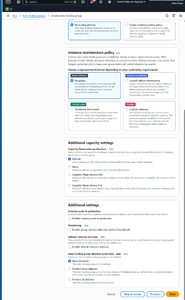 Figure 1: The Deletion Protection Settings Are Located in the Additional Settings Section.
Now, just complete the wizard in the usual way. The auto scaling group will be protected based on the level of protection that you have specified.
About the Author
Brien Posey is a 22-time Microsoft MVP with decades of IT experience. As a freelance writer, Posey has written thousands of articles and contributed to several dozen books on a wide variety of IT topics. Prior to going freelance, Posey was a CIO for a national chain of hospitals and health care facilities. He has also served as a network administrator for some of the country's largest insurance companies and for the Department of Defense at Fort Knox. In addition to his continued work in IT, Posey has spent the last several years actively training as a commercial scientist-astronaut candidate in preparation to fly on a mission to study polar mesospheric clouds from space. You can follow his spaceflight training on his Web site.