AWS Step-by-Step
Getting Started with VPC Encryption Enforcement, Part 2
In the first part of this series, I discussed the basic concept of using encryption controls as a tool for making sure that the network traffic within a VPC is being properly encrypted.
Now, I want to continue the discussion by showing you how to set up encryption controls within a VPC. My personal recommendation is to create a lab-based VPC that you can use to experiment with encryption controls, and to avoid implementing encryption controls in your production environment until you feel comfortable using them.
To get started with setting up encryption controls, sign in to the AWS console and go to your VPC dashboard. Now, click on Your VPCs. At this point, you will need to select the VPC for which you want to ensure encryption and then select the Create Encryption Control setting from the Actions menu, as shown in Figure 1.
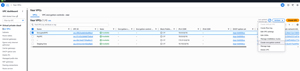 [Click on image for larger view.] Figure 1: Select your VPC and then choose the Create Encryption Control command from the Actions menu.
At this point, you will be taken to the Create Encryption Control screen, which you can see in Figure 2. The first option on this screen is a setting which allows you to assign a name to the VPC's encryption control. You don't have to assign a name, but doing so can make it easier to keep track of resources as your environment scales.
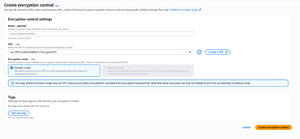 [Click on image for larger view.] Figure 2 This is the page used for creating an encryption control.
The next thing that you will need to do is to select your VPC. The correct VPC is likely already listed, but it's important to check to be sure.
The next thing that you will need to do is to choose between monitor mode and enforcement mode. You will notice in the screen capture that enforcement mode is grayed out. The reason for this is that enabling enforcement mode prematurely tends to break things. As such, Amazon requires you to make sure that all of the resources within your VPC are encryption capable or have been excluded from the requirement for encryption before you enforce encryption.
Finally, you are given the option of assigning tags to the encryption control that you are creating. When you are done, click on the Create Encryption Control button to complete the process. When you do, the encryption control will be created immediately, but it can take a few minutes for AWS to evaluate all of the resources that exist within your VPC.
Now that you have created an encryption control, the next step in the process is to identify any resources that are not configured to use encryption and to either remediate those resources, or set up an exclusion. My guess is that Amazon will eventually modify the console to make it easier to access the encryption controls, but for right now that portion of the console is somewhat hidden. To access it, select the Your VPCs tab and then click on the VPC for which you just created an encryption control. When you do, you will be taken to the VPC Details screen, similar to what you see in Figure 3. If you look closely at the Details section, you will notice that there is an Encryption Control ID listed. Clicking on this ID takes you to the encryption control for the VPC.
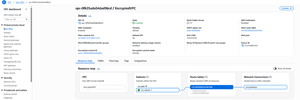 [Click on image for larger view.] Figure 3: Click on the Encryption Control ID to access the VPC encryption.
Upon clicking the Encryption Control ID, you will be taken to a screen similar to the one shown in Figure 4. As you can see in the figure, there are several exclusions listed. These particular exclusions were created automatically as a part of the encryption control creation process. Keep in mind however, that these exclusions are essentially exclusion categories. The Number of Resources column indicates how many actual resources are associated with the exclusion type. As an example, my VPC does not contain a virtual private gateway, hence the Virtual Private Gateway category is listed, but the count is set at zero.
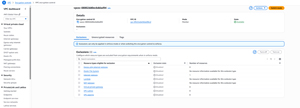 [Click on image for larger view.] Figure 4: These are the exclusions that were created automatically.
As you look at the screen capture above, you will notice that there is also a tab labeled Unencrypted Resources. Clicking on this tab shows you the resources within the VPC that have been identified as being unencrypted, as shown in Figure 5. Once again, it can take some time for resources to be added to this list. In this particular case, two resources were found, one of which is eligible for exclusion, and one is not. The interface that is not eligible for exclusion is assigned to an EC2 instance. As such, if this were a production environment, I would probably end up migrating the instance to a Nitro instance, which seamlessly supports encryption.
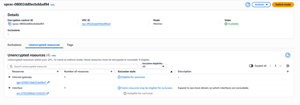 [Click on image for larger view.] Figure 5: These are my VPC's unencrypted resources.
After you remediate a resource (or create an exception), you can click the Refresh icon, which updates the display to reflect your changes. Once all of the resources have either created an exception for or remediated all resources, you can switch over to Enforcement Mode by clicking the Switch Mode button. Remember, once you switch to Enforcement Mode, you can no longer create unencrypted resources within the VPC.
About the Author
Brien Posey is a 22-time Microsoft MVP with decades of IT experience. As a freelance writer, Posey has written thousands of articles and contributed to several dozen books on a wide variety of IT topics. Prior to going freelance, Posey was a CIO for a national chain of hospitals and health care facilities. He has also served as a network administrator for some of the country's largest insurance companies and for the Department of Defense at Fort Knox. In addition to his continued work in IT, Posey has spent the last several years actively training as a commercial scientist-astronaut candidate in preparation to fly on a mission to study polar mesospheric clouds from space. You can follow his spaceflight training on his Web site.